
Creative formats for Apple Search Ads
- Custom Product Pages
- Specifications for screenshots from the app
- Application previews
- Video specifications
- Application preview resolution
Publish additional versions of your App Store product page, each of which highlights a feature or specific content from your app and has a unique URL that you can share.
iPhone 6.5 inches is the required size, others are optional.
Multiple variations can be planned for a single dimension, then tested within Custom Product Pages.
Max. 3 “app previews” and 10 “screenshots”.
Up to 35 additional versions of your product page in the App Store for iPhone and iPad.
Ads will only appear on those devices for which dimensions are available. This can both limit and extend the reach of your campaigns.
Custom Product Pages
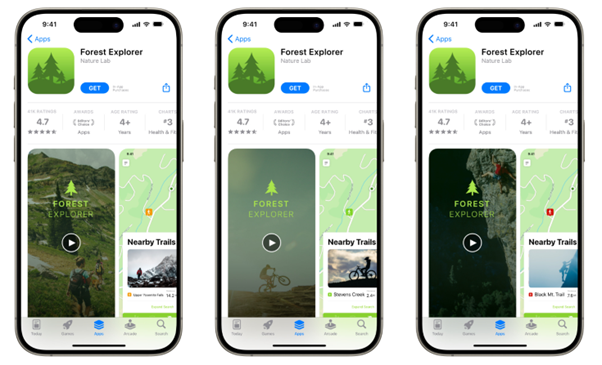
An example of how a different Custom Product Page can look like, using different creative:
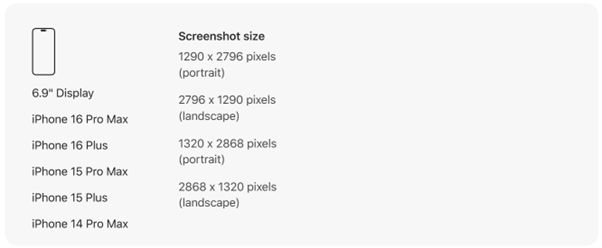
Specifications for screenshots from the app
iPhone
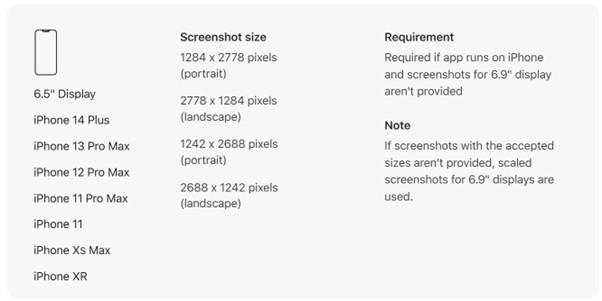
6.5″ requirements:
Required if the app is running on an iPhone and screenshots for a 6.9″ display are not available
Notes:
If screenshots with appropriate sizes are not provided, scaled screenshots for 6.9″ displays will be used.
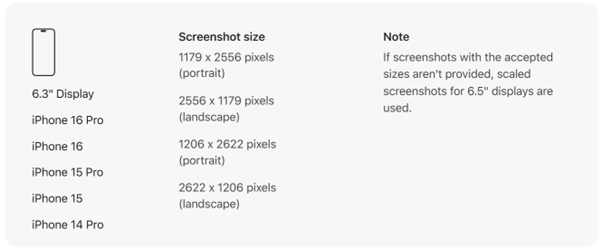
Note
If screenshots with appropriate sizes are not provided, the reduced screenshots for 6.5″ displays shall be used.
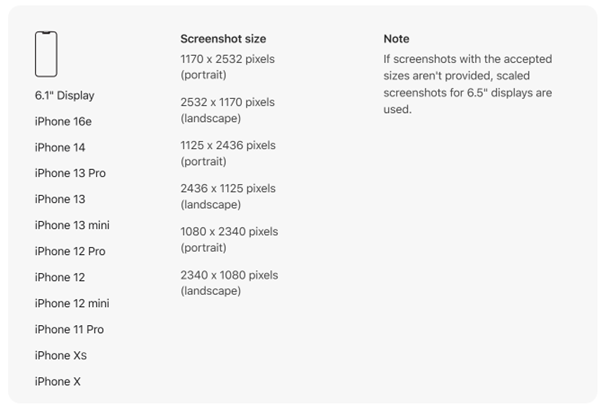
Note
If screenshots with appropriate sizes are not provided, the reduced screenshots for 6.5″ displays shall be used.
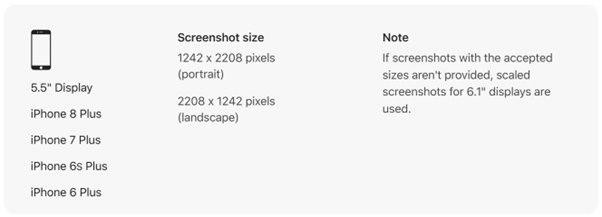
Note
If screenshots with appropriate sizes are not provided, the reduced screenshots for 6.1″ displays shall be used.
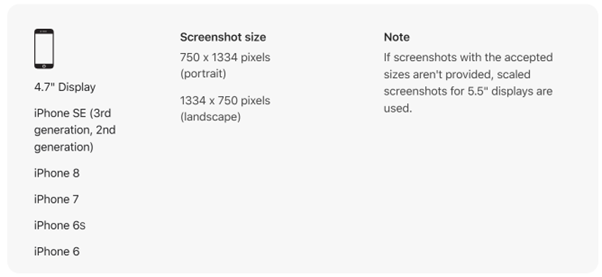
Note
If screenshots with appropriate sizes are not provided, the reduced screenshots for 5.5″ displays shall be used.
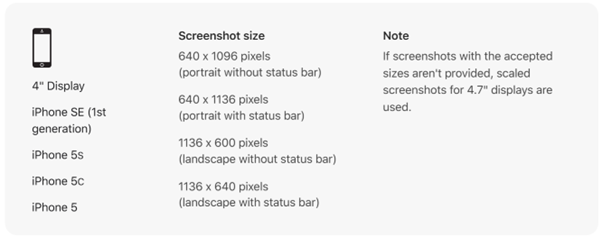
Note
If screenshots with appropriate sizes are not provided, the reduced screenshots for 4.7″ displays are used.
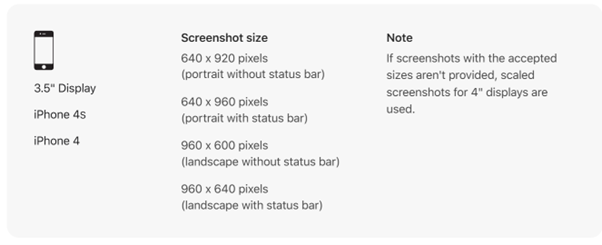
Note
If screenshots with appropriate sizes are not provided, use scaled screenshots for 4″ displays.
iPad
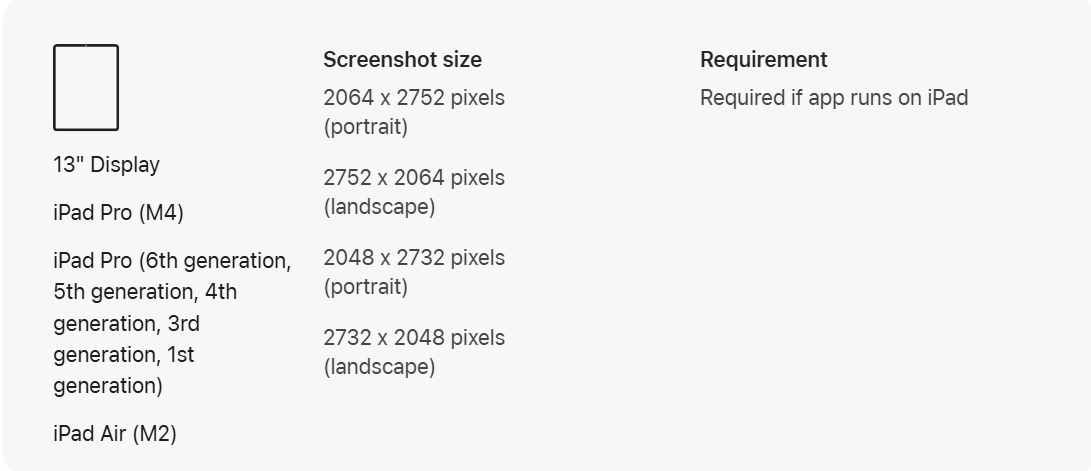
Requirements
Required if the app runs on an iPad
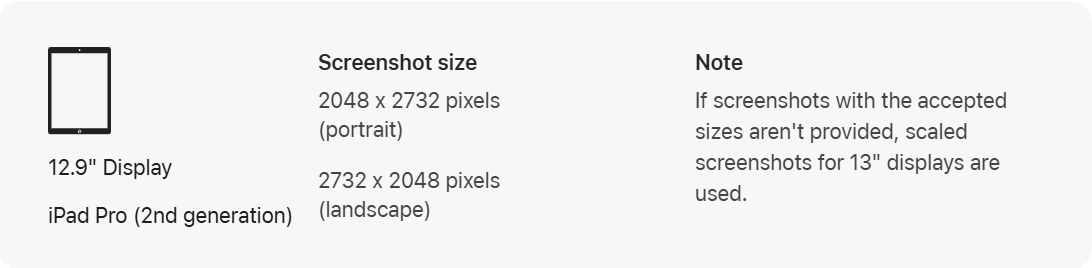
Note
If screenshots with appropriate sizes are not provided, the reduced screenshots for 13″ displays will be used.
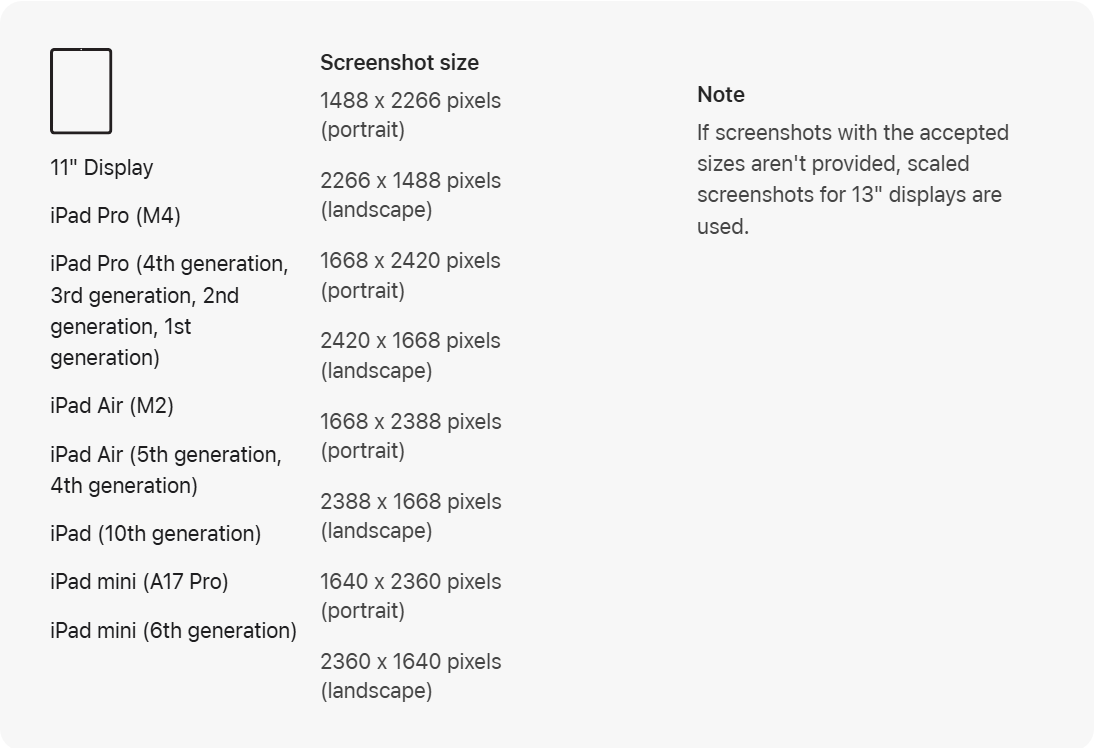
Note
If screenshots with appropriate sizes are not provided, the reduced screenshots for 13″ displays will be used.
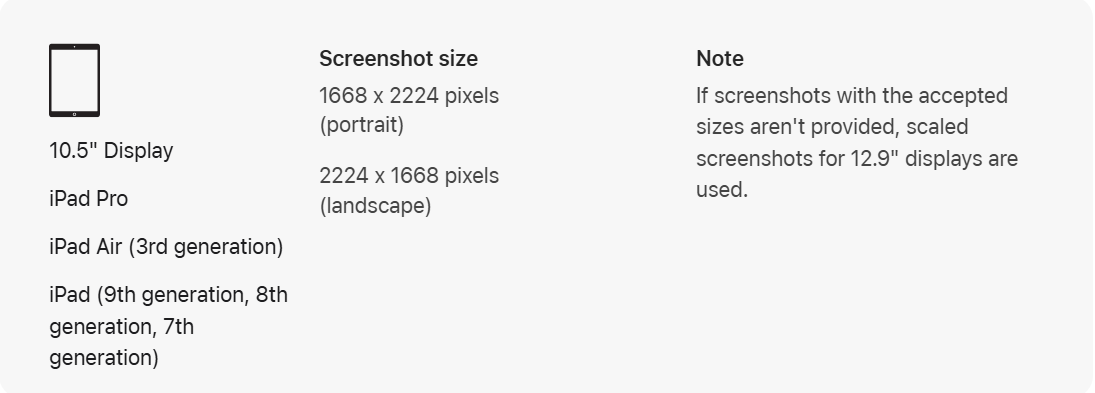
Note
If screenshots with appropriate sizes are not provided, the reduced screenshots for 12.9″ displays will be used.
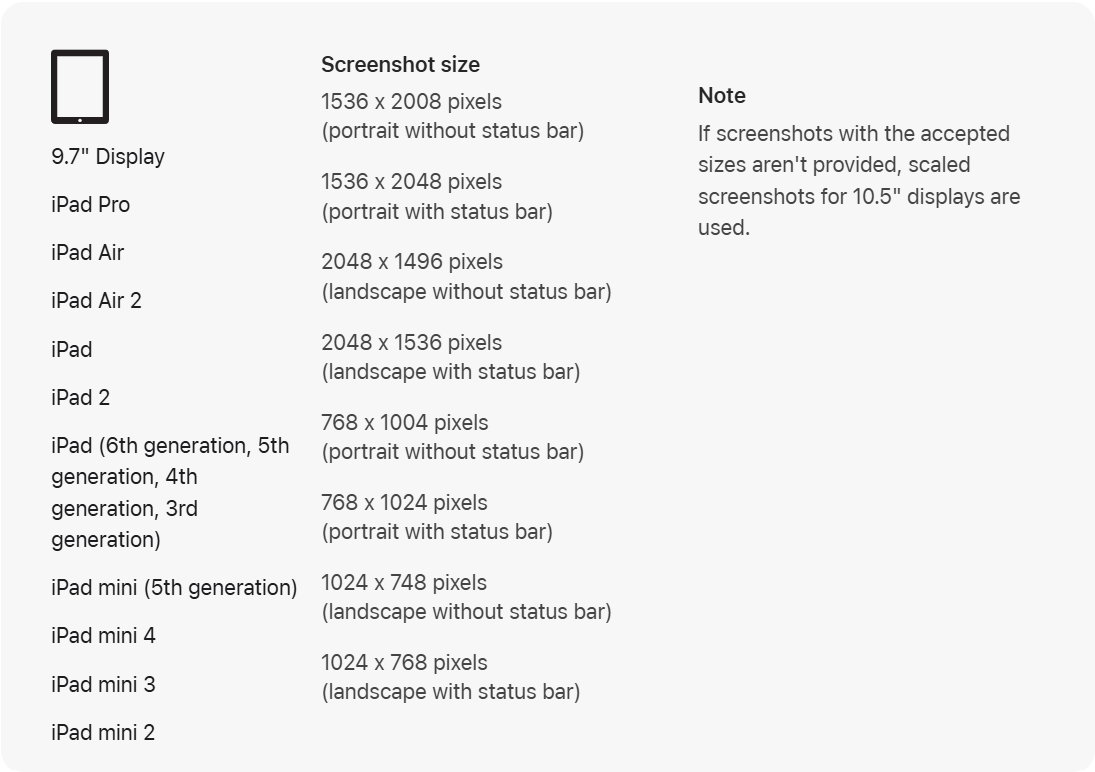
Note
If screenshots with appropriate sizes are not provided, use scaled screenshots for 10.5″ displays.
Application previews
You can provide application previews in H.264 and ProRes 422 (HQ only) formats with the following specifications.
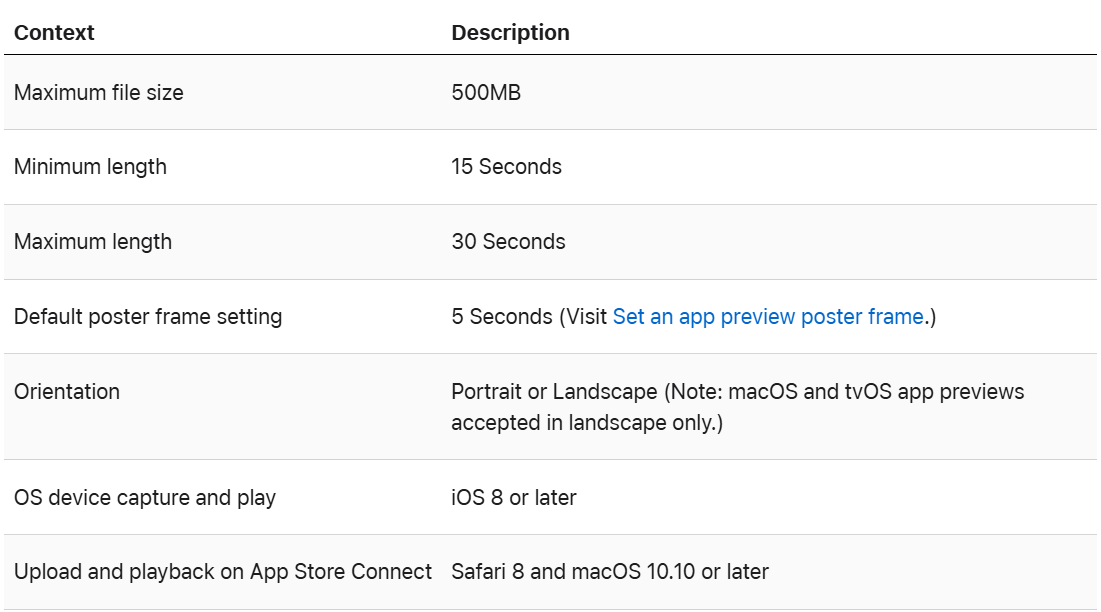
Video specification
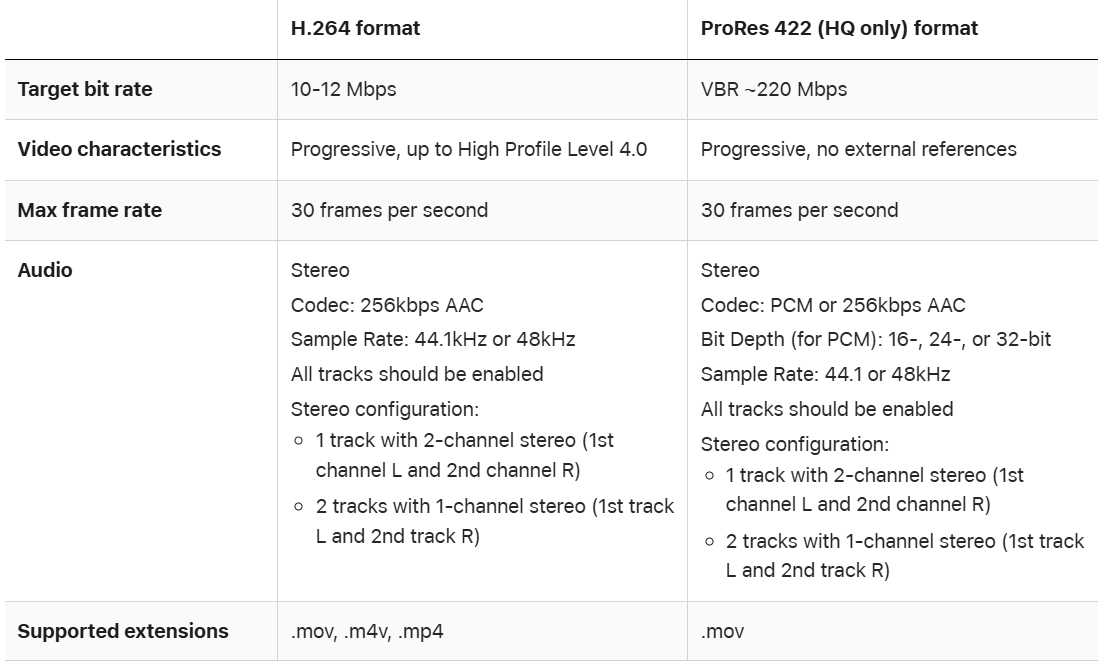
Application preview resolution
iPhone
| Device size | Size of app preview |
| 6.9″ Display | 886 x 1920 pixels (portrait) |
| 1920 x 886 pixels (horizontal) |
|
| 6.5″ Display |
886 x 1920 pixels (portrait) |
|
1920 x 886 pixels (horizontal) |
|
| 6.1″ Display |
886 x 1920 pixels (portrait) |
|
1920 x 886 pixels (horizontal) |
|
| 5.5″ Display |
1080 x 1920 pixels (portrait) |
|
1920 x 1080 pixels (horizontal) |
|
| 4.7″ Display |
750 x 1334 pixels (portrait) |
|
1334 x 750 pixels (horizontal) |
|
| 4″ Display |
1080 x 1920 pixels (portrait) |
|
1920 x 1080 pixels (horizontal) |
|
| 3.5″ Display | No option to add app preview |
iPad
| Device size | Size of app preview |
| 13″ Display | 1200 x 1600 pixels (portrait) |
| 1600 x 1200 pixels (horizontal) |
|
| 12.9″ Display |
1200 x 1600 pixels (portrait) |
|
1600 x 1200 pixels (horizontal) |
|
|
900 x 1200 pixels (portrait) |
|
|
1200 x 900 pixels (horizontal) |
|
| 11″ Display |
1200 x 1600 pixels (portrait) |
|
1600 x 1200 pixels (horizontal) |
|
| 10.5″ Display |
1600 x 1200 pixels (horizontal) |
|
1200 x 1600 pixels (portrait) |
|
| 9.7″ Display |
900 x 1200 pixels (portrait) |
|
1200 x 900 pixels (horizontal) |